
티스토리 뷰
Xib로 CustomView 만들기
View 파일과 Swift 파일을 만들어 준다.

여기서 중요한 점은 File's Owner 에 CustomView Swift 파일을 지정해주고 View에 대한 Class 는 지정해주지 않는다.


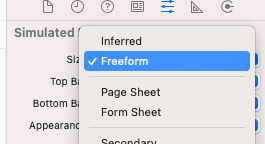
사이즈 Freeform 으로 설정
CustomView
class EmptyDataView: UIView {

    @IBOutlet var descLabel: UILabel!
    @IBOutlet var imageView1: UIImageView!
    @IBOutlet var imageView2: UIImageView!
    @IBOutlet var imageView3: UIImageView!
    @IBOutlet var addButton: UIButton!

    @IBOutlet var customView: UIView!


    init(frame: CGRect,descText: String, buttonText:String) {
       super.init(frame:frame)
       self.setup()


       /...

     }

    required init?(coder: NSCoder) {
        super.init(coder: coder)
        self.setup()

    }

    private func setup() {

        let identifier = String(describing: EmptyDataView.self)


        if let view = UINib(nibName: identifier, bundle: nil).instantiate(withOwner: self, options: nil).first as? UIView {
            view.frame = self.bounds
            addSubview(view)
        }

       /...

    }
}
ViewController
class TradingDailyViewController: UIViewController {


    lazy var emptyView = EmptyDataView(frame:.zero , descText: "하루하루 매매일지를 기록해보세요", buttonText: "매매일지 기록하기")

    override func viewDidLoad() {
      view.addSubview(emptyView)
    }

}
Reference
'IOS > UIKit' 카테고리의 다른 글
| iOS ViewController 생명주기 (0) | 2022.07.03 |
|---|---|
| [AutoLayout] Hugging priority & Compression Priority (0) | 2022.03.24 |
| UIScrollView 구현 (0) | 2022.02.05 |
| UIStackView 기초 (0) | 2022.01.28 |
| collectionView cell 삭제 (0) | 2021.12.16 |